Create a Scrum Board Online – Agile, Visual & Collaborative
Transform complex projects into clear, manageable tasks. With the online Scrum Board from Collaboard, you can visualize sprints, manage your backlog, and keep your team synchronized—whether they are in the office or working remotely. Start now and bring true agility to your projects.
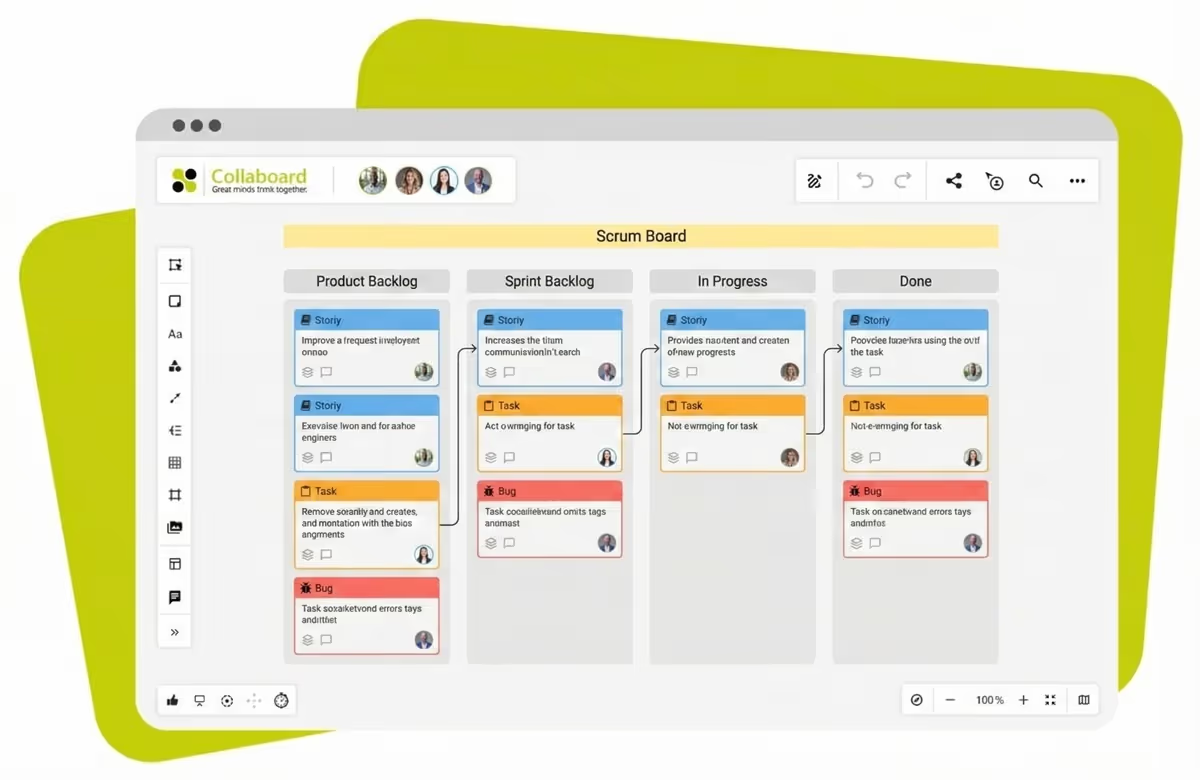
What is a Scrum Board?
A Scrum Board is a visual tool used in agile project management to track the progress of a team during a specific sprint. It provides transparency by organizing tasks (User Stories) and makes bottlenecks immediately visible.
Classically, a Scrum Board is divided into vertical columns that represent the workflow. The simplest structure consists of three phases:
- To Do: Tasks planned for the current sprint.
- Doing (In Progress): Tasks currently being worked on.
- Done: Tasks that have been successfully completed.
The Difference Between a Scrum Board & Kanban Board
Although both boards look visually similar - using columns and cards—they differ fundamentally in their methodology:
Conclusion: Use a Scrum Board if your team works in fixed iterations (Sprints). Use Kanban if tasks should be processed continuously (e.g., in IT Support).
How to Create Your Scrum Board in 5 Steps
With Collaboard, you can digitize your physical whiteboard in seconds. Here is how to get started:
- Create a New Board: Start with an infinite blank canvas or choose our professional Scrum Template.
- Define Your Columns: Set up the structure. Besides "To Do," "Doing," and "Done," you can add columns like "Review" or "Testing."
- Fill the Backlog: Create digital sticky notes for your User Stories and tasks.
- Sprint Planning: Drag the tasks scheduled for the next cycle into the "To Do" column of the sprint area.
- Assign & Work: Assign tasks to team members using name tags. During the Daily Scrum, move the cards together in real-time.
Why Choose Collaboard for Your Scrum Team?
Collaboard is more than just a task manager. It is an infinite online whiteboard that fosters the creativity and flexibility of agile teams.
- Real-Time Collaboration: All changes are instantly visible to everyone—perfect for Daily Stand-up meetings via video call.
- All in One Place: Integrate images, documents, links, and wireframes directly next to your tasks. Your Scrum Board becomes the central knowledge hub.
- Data Security (GDPR): Hosting options in Switzerland or Germany ensure maximum security for
sensitive project data. Additionally Collaboard offers self-hosting (on-premises or private cloud) - Flexible Cards: Use colors, shapes, and tags to visualize priorities or assignees clearly.
Scrum Board Templates & Examples
Depending on team size and project type, the layout of a board can vary. In Collaboard, you will find templates for various scenarios:
- The Basic Board: 3 Columns (To Do, Doing, Done). Perfect for beginners.
- The Software Dev Board: Backlog → Sprint Backlog → Dev → Code Review → Testing → Done.
- The Design Team Board: Includes columns for "Draft," "Feedback," and "Final Approval."
- Retrospective Board: Often used alongside Scrum to analyze the sprint: "Start, Stop, Continue."
On This Page
Start your next whiteboard now
Try Collaboard for free and convince yourself.
Scrum Board - Frequently Asked Questions
Do you have any questions? We're here to help.
An online scrum board is ideal for hybrid or distributed teams working remotely. Unlike a physical board in the office, everyone can access it from anywhere. In addition, no sticky notes get lost, and you can attach digital assets such as PDFs, design drafts or links directly to the tasks. The history of tasks is also preserved digitally.
Swimlanes are horizontal subdivisions of the board used to further structure tasks. You can use them, for example, to separate tasks by different teams, priorities (e.g. a "Fast Lane" for critical bugs) or topic areas, while the vertical columns continue to show the status (To Do, Doing, Done).
The scrum board should always reflect the current state of reality. Ideally, it is updated at least once a day at the Daily Scrum (stand-up meeting). When a team member starts or completes a task, the card should be moved immediately so that everyone can see what is currently being worked on and where potential bottlenecks may arise.
Tasks that are not "Done" go back into the product backlog, where they are re-prioritized and scheduled for the next sprint.
In a self-organized team, ideally the team members themselves should move their tasks from "To Do" to "Doing" and "Done". This promotes ownership and accountability.
Start your next whiteboard now
Get a free trial of Collaboard with up to 3 boards and five people per session. All key features are available for you to try out.


